




How AI coding assistants can silently execute malicious binaries through PATH hijacking.
We’ve reviewed prominent AI Coding Assistants and found out they’re silently relying on pre-existing executables, without verifying their existence. A threat actor can abuse PATH lookup to cause the coding assistants to execute a malicious payload.
Introduction
Back when I was doing my research into AIKatz, the folks at MSRC left me with a curious remark - AIKatz doesn’t count as a vulnerability since it "didn't cross a security boundary." A user already had to be compromised for the attack to work. While looking for ways to bypass that, I stumbled upon a path interception vulnerability rooted in an Intel graphics driver that was triggered from Claude’s desktop application.
These kinds of risks are why securing Claude across Code, Cowork, and agents requires controls that extend beyond the model itself. So I decided to keep a "pitfall" folder on my machine as a permanent tripwire to see which AI applications would fall for the same trick.
The results were startling. It wasn't just one tool; virtually all major IDEs fell for it simultaneously, and in remarkably similar ways.

This isn't just a bug; it's a systemic pattern in how AI-powered development tools interact with the operating system.
The Attack Surface
The vulnerability is deceptively simple: coding assistants often attempt to execute specific binaries blindly. They don't check for the absolute path or verify the existence of the file before calling it. Instead, they launch them by name only. This triggers a search across every directory listed in the PATH environment variable.
If an attacker can place a malicious executable with the right name in any folder within the PATH, the LLM will execute it without hesitation.
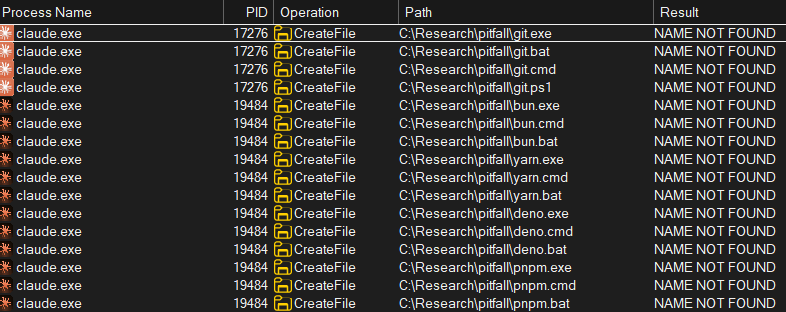
We surveyed all prominent AI Coding assistants, and they all share the same pattern, albeit with different executables.
They’re summarized in the table below:
You might notice that there are some similarities between the executables that different coding assistants try to launch. There’s actually a very good reason for that.
Common “Ancestor”
The main similarities are between Cursor, Antigravity and VS Code. Since both Antigravity and Cursor are VS Code forks, it’s entirely possible that this is some automatic logic in VS Code, that was also forked to Cursor and Antigravity (and likely others as well). We can prove this applies to at least one of those executables: hatch, a Python environment manager.
If you check VSCode’s GitHub repository, and more specifically, its Python extension code, you’ll see that support for hatch was added back in 2024. Inside it, we can see that to check if hatch is used in the current project, it simply tries to run the hatch executable with an enumeration argument.

The hatch lookup changed in May 2026, when hatch support was added in the python-environment-tools in VSCode. The new logic doesn’t spawn hatch.exe for enumeration, and instead parses the project’s .toml configuration files. This coincides with our recent observations, where we don’t see hatch.exe lookups anymore. We’re not sure if it’s related to our disclosure but the timing is, well, interesting.
Model Bias
The hatch story is interesting because it reframes the attack pattern as a supply chain issue, but that’s just one pattern out of many. Besides the executables that are looked for by the IDE itself, the AI Agent also has a lot of tool and command execution.
Different models have different training materials and procedures, so naturally they have different “preferences” and “habits” for tools. For example I had to explicitly add a memory to Claude Code, to instruct it to use python when launching python scripts, because it kept trying to run python3. The same pitfall pattern would happen whenever it tried the wrong executable name. And that’s just one example out of the plethora of tools the Agent knows how to run.
Immediate Impact
At first glance, the impact might seem negligible. If an attacker can already write files to a PATH directory, it means they have local access. They can execute any process they want, why should they go the roundabout way of getting execution via PATH? It’s a similar question as was raised in AIKatz, which also affected Vendor response.
There are two critical advantages that make this attack a useful tool in a threat actor’s arsenal:
1. Lateral Movement in Shared Environments
Many organizations use shared terminal servers to save on hardware costs. In these environments, multiple employees connect to the same remote machine.
This vulnerability allows an attacker to propagate from one breached user to another. By placing a binary in a shared folder in the server, like a common tools or scripts folder, an attacker can achieve lateral movement—or even privilege escalation if the next victim is an administrator.
2. A Hidden Persistence Mechanism
Because many IDEs launch these missing binaries during startup or as background tasks, they serve as an ideal persistence mechanism. Since AI coding assistants are used daily, the malicious payload is guaranteed to execute regularly.
More importantly, because these tools launch legitimate executables constantly, a malicious child process is much less likely to trigger EDR alerts or pass under the radar of the organization's SOC’s review.
Escalating to Remote Code Execution
While the local scenarios are concerning, the true danger emerges when we combine this with the native capabilities of modern LLMs. This attack technique can elevate any file-writing primitive into full Remote Code Execution (RCE).
If an attacker can trick an LLM into writing a controlled payload into a PATH folder, it's game over. Modern AI assistants are perfectly equipped for this: they can read environment variables, modify the PATH, and write files.
There are two primary ways to weaponize this "cooperation":
- Context Poisoning: Injecting malicious prompts or jailbreaks into GitHub issues, comments, or any interface the agent monitors. With the rise of Model Context Protocol (MCP), the attack surface is expanding rapidly.
- Supply Chain Attacks: AI skills and plugins often come with dependencies. A malicious skill can simply instruct the AI agent to add its own script folder to the PATH. Users are statistically much more likely to approve a "path modification" than a direct "binary execution," lowering the social engineering threshold for the attacker.
Mitigations
- Apply AI security and governance: By strictly inspecting all inputs flowing into the AI agent, organizations can break the initial link in the RCE chain, blocking malicious skills and prompt injections before they can influence the file system.
- Ensure path and process restrictions: AI agents should operate with a known-good set of executables. Detection engineers can alert on any deviation from this baseline. Since the vulnerability relies on the PATH search order, restricting the agent's ability to modify environment variables or execute files from user-writable directories is a critical defense-in-depth measure.
Conclusion
Project Pitfall highlights a fundamental oversight in the rush to integrate AI into our development workflows.
While this research focused on Windows, the same logic applies to macOS and Linux, which rely just as heavily on the PATH variable.
The good news is that defenders don't have to wait for AI vendors to address this. By understanding the attack chain, from context poisoning to binary hijacking, security teams can implement detections today that prevent these silent "pitfalls" from becoming full-scale attack escalations.
Responsible Disclosure
Feb 16, 2026 - Disclosed to MSRC
Mar 23, 2026 - Disclosed to Cursor
Mar 24, 2026 - Disclosed to Anthropic
Mar 24, 2026 - Anthropic disclosure closed as duplicate
Apr 7, 2026 - MSRC disclosure closed as informative
Apr 27, 2026 - Cursor disclosure closed as informative

