




How attackers can use auto-updates to turn AI coding tools like Cursor, VSCode and Claude Code into paths for remote code execution.
Lumia researchers found a fundamental attack pattern shared across AI applications: intercepting the auto-update mechanisms of AI coding tools and IDEs. By positioning a Machine-in-the-Middle (MITM) between the application and its update server, an attacker can serve a malicious payload instead of a legitimate update.
Executive Summary
- Lumia researchers found a fundamental attack pattern against popular AI coding assistants: their update mechanisms can be intercepted by network-adjacent attackers, leading to remote code execution.
- The update interception requires a source of shared trust. We demonstrate that enterprise networks often contain such trust sources that attackers can exploit, such as SASE applications or AD CS.
- AI vendors can easily mitigate this attack by shipping signed executables, and verifying those signatures, yet only one vendor does so in practice.
- Following our disclosures, we noticed improvements in some products, like Claude Code and Cursor, yet they’re not enough to mitigate this attack.
Introduction
Lumia is a network-based security solution, which means we see a lot of AI and LLM traffic. This includes AI applications’ updates, which we usually don’t really care about; we govern AI usage and interactions, not the client applications themselves. But after seeing Notepad++’s hijack by state-sponsored hackers earlier this year, we had to wonder: which AI application updates aren’t signed? Can they be hijacked as well?
Now we’re obviously not state-sponsored hackers, so we’re not going to try to take over OpenAI’s servers to serve malicious updates. Instead we narrowed the scope of our questions:
- Do AI application updates use signed binaries?
- Is the signature enforced or validated?
- What is the minimum level of trust or interception required to serve illegitimate binaries instead?
Turns out, most of the updates aren’t signed, and where they are, the signature isn’t enforced. You can see a summary of our findings below:
The Attack Flow
The whole flow is pretty simple:
- Positioning: Establish a MITM TLS tunnel between the victim application and its update server.
- Version Interception: Intercept the initial version-check request. Respond with a forged “new update available” message, redirecting the download URL to an attacker-controlled endpoint.
- Payload Delivery: Intercept the subsequent download request and serve a malicious binary transparently.
- Execution: The application “installs” and executes the payload automatically, which can then download the actual update, maintaining the appearance of a standard update.
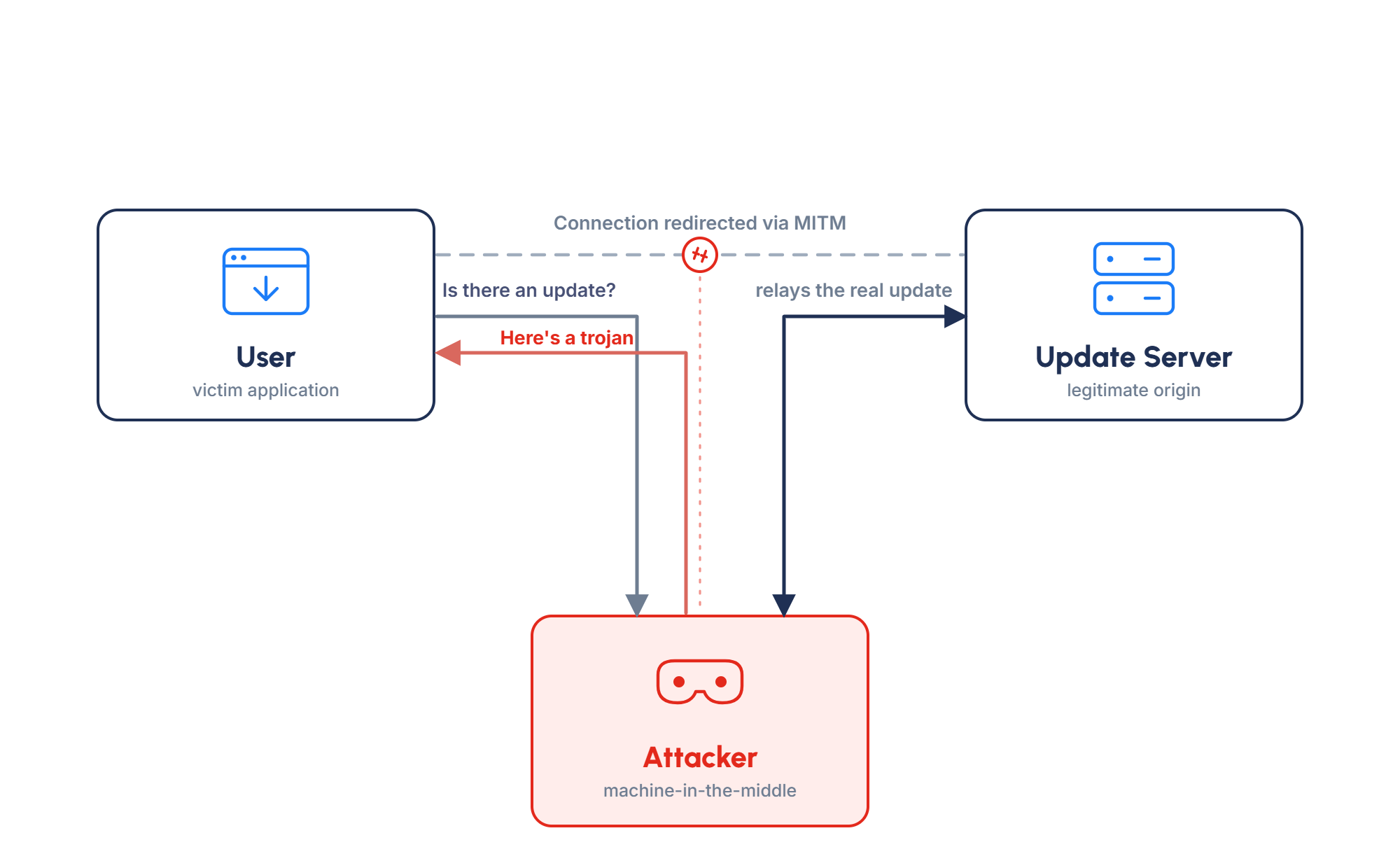
Observant readers will have noticed the glaring issue in this flow: getting a MITM TLS tunnel is a major hurdle to overcome, which is also why none of the vendors treat this attack as a vulnerability.
However, later in this blog, we’ll show how this hurdle is a bit lower in corporate networks. In fact, relying on TLS security isn’t necessarily future proof, as the recent eMudhra incident shows compromises can happen. Eight Certificate Authority (CA) certificates had their private keys compromised due to insufficient randomness, which allowed any threat actor to MITM any TLS traffic using these certificates.
But I digress. Now, let’s see how easy it is to serve fake updates after you establish the MITM.
UpdateMITMing AI Apps
Cursor, Antigravity and Their Father, VSCode
Likely because they are VSCode forks, the update mechanism of Cursor, Antigravity and VSCode is remarkably similar.
The IDE reaches out to the update server, receives the update metadata and download link, and then downloads and executes the update. No signature validation or verification exists beyond the TLS session used for the HTTPS requests.
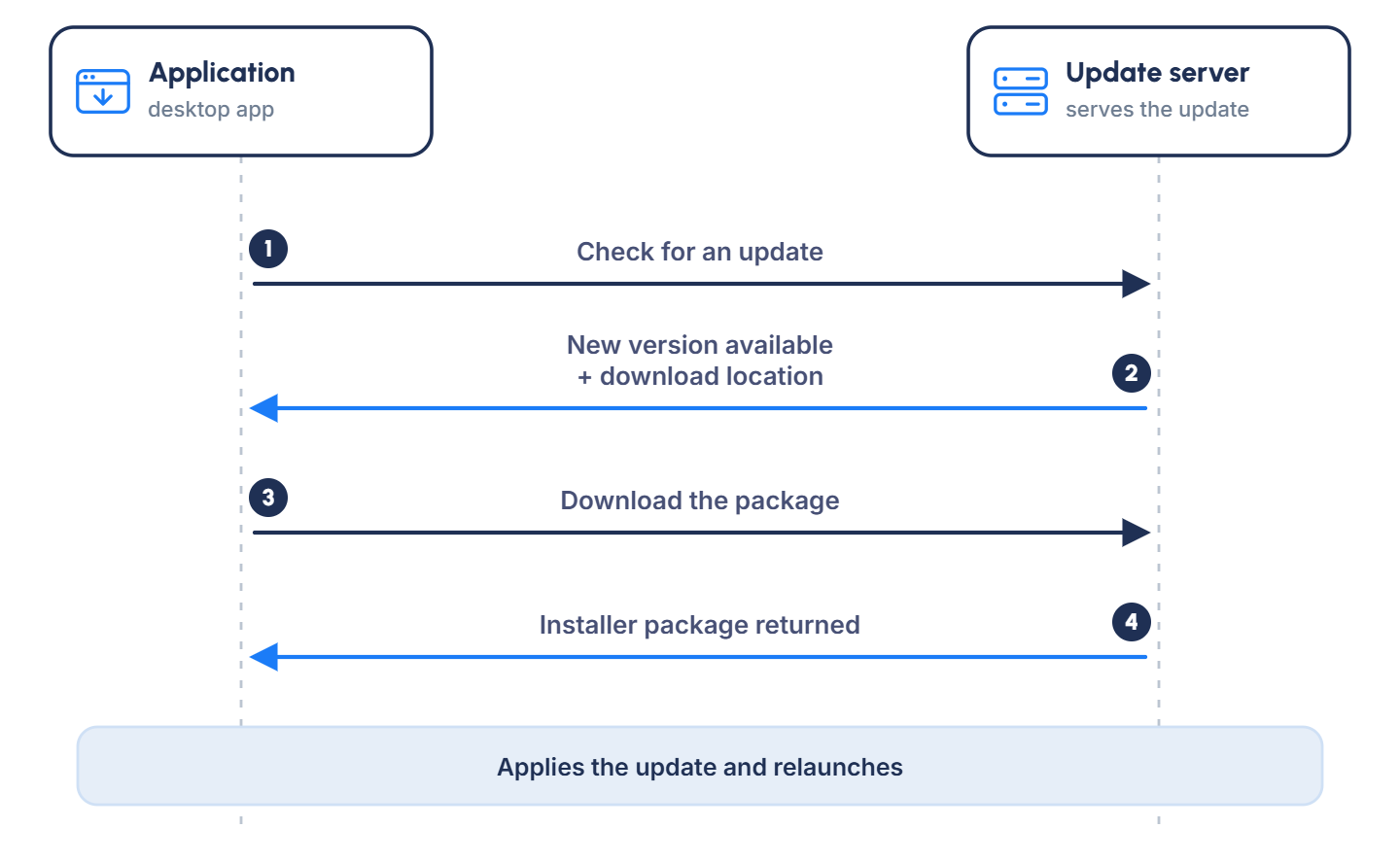
In the case of VSCode and Antigravity, the metadata contains the hash or checksum of the update binary, yet that’s not enough to stop the hijack. We can simply update the checksum to the one of our malicious binary.
Claude Code CLI
Claude Desktop and Claude Code's update flow is very similar to VSCode's and the rest, with the main difference being that Claude’s binaries are digitally signed by Anthropic.
Unfortunately, the digital signature isn’t checked at all, so even if an attacker serves a regular, non-signed binary, it would be executed.
Newer versions of Claude Code CLI (> 2.1.207) have the update metadata digitally signed by Anthropic, which should make tampering impossible. This check, however, is gated by a feature-flag that isn’t signed, so with the already established MITM a threat actor can simply disable the flag, which disables the signature check and allows the untrusted update.
Claude Desktop
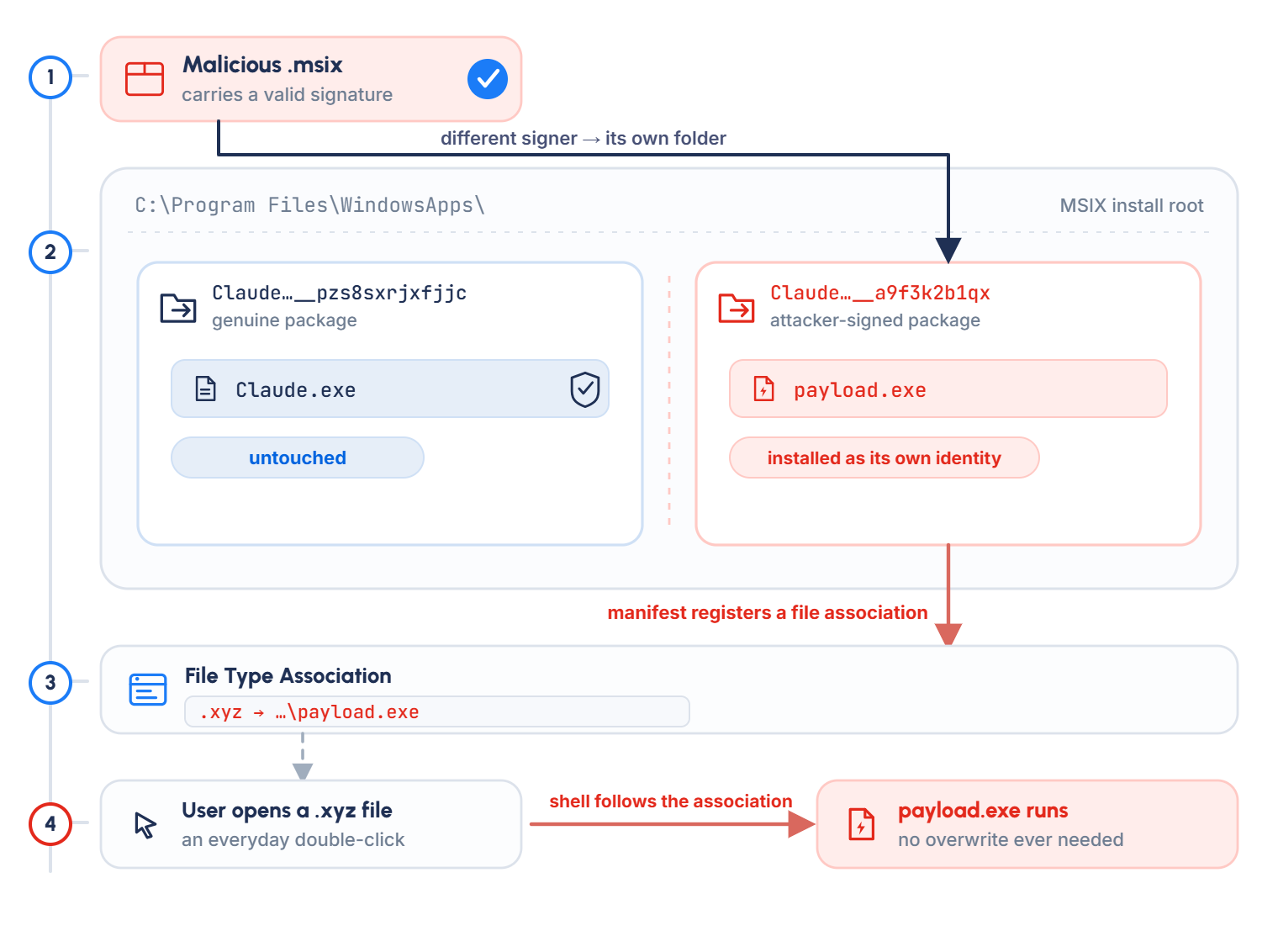
Claude Desktop actually has two update flows: the first is similar to what we described above, and the other uses MSIX packages. MSIX is a packaging format for application installations.
MSIX packages raise the bar for exploitation, as they must be signed with a legitimate code-signing certificate, and the installation path depends on the identity of the signer. So a malicious MSIX package must be digitally signed, and cannot overwrite Claude’s EXE file, since it would be installed to a different location. Instead, a malicious MSIX installer can register a file extension association that will trigger the malicious executable when such a file is opened.
NOT UpdateMITMing ChatGPT and Codex
OpenAI took the MSIX concept one step further, which makes both ChatGPT and Codex secure against this MITM trick. Instead of downloading packages and installing them manually, everything, both updates and installation, is handled via the Microsoft Store. The app only checks if there’s a published update, and verifies that the received app ID is the same as the one in the Microsoft Store. If an attacker wants to attack ChatGPT and Codex, they must attack the Microsoft Store, which is a different kind of hornet’s nest altogether.
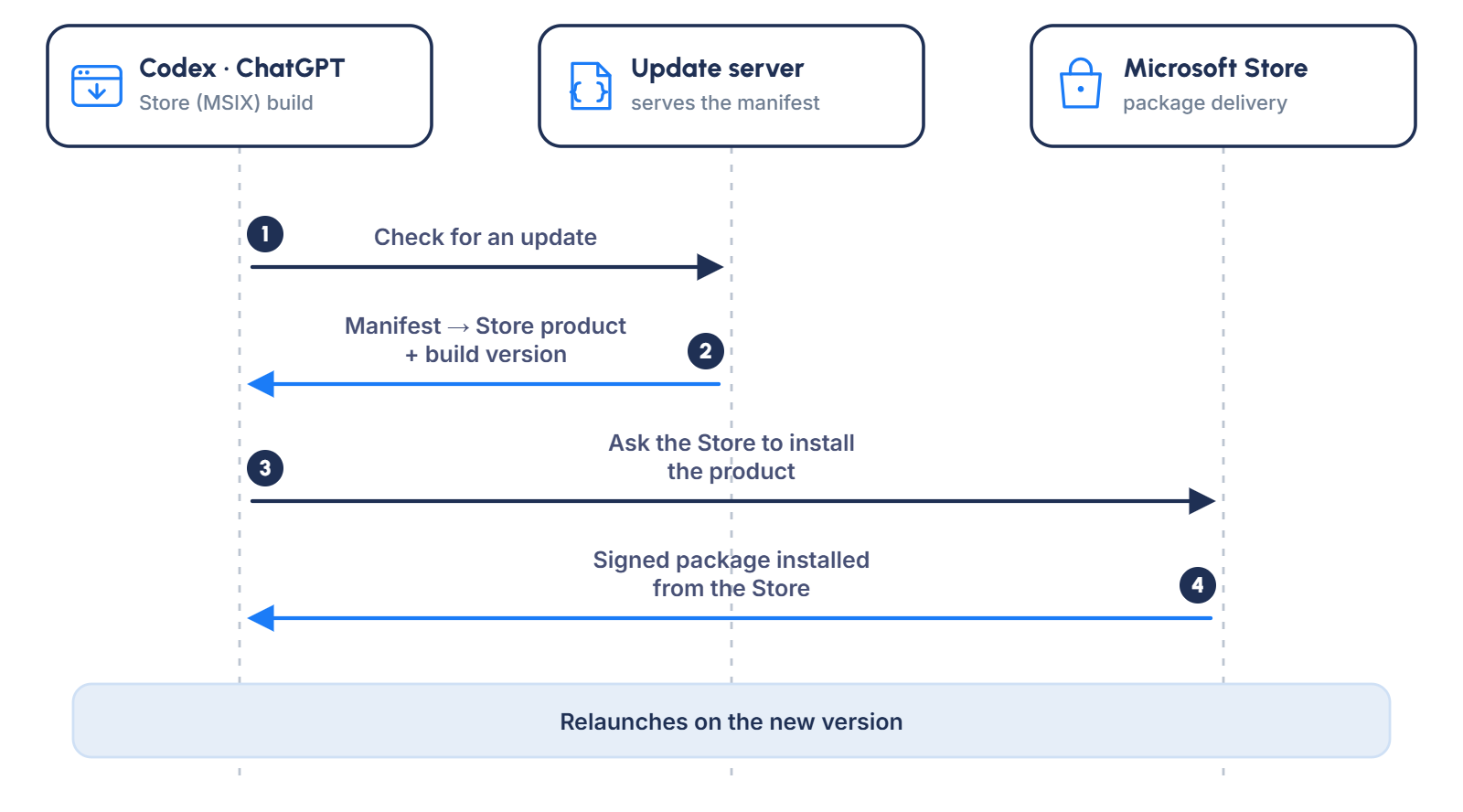
Of course, this doesn’t mean we can’t do this kind of attack at all; we just need to change our targets.
The Codex (now ChatGPT) desktop app also runs codex CLI, which, on every boot, calls the backend API for a list of plugins to install. Each entry contains a bundle_download_url. We can insert a fake plugin that points at our server. The CLI will then download and register it with no user interaction. The injected plugin can contain a malicious skill that will be read by the LLM to achieve an indirect prompt injection. We can then combine this with a pitfall attack to achieve code execution.
From the Lab to the Enterprise
So far, we’ve been operating on the almost theoretical premise of having a TLS trust between our MITM and the victim. Now let’s see how an enterprise network can make it a reality.
Data Loss Permission
Many organizations use Secure Access Service Edge (SASE) or Data Loss Prevention (DLP) services to ensure their data is safe and that no sensitive information leaves their organization.
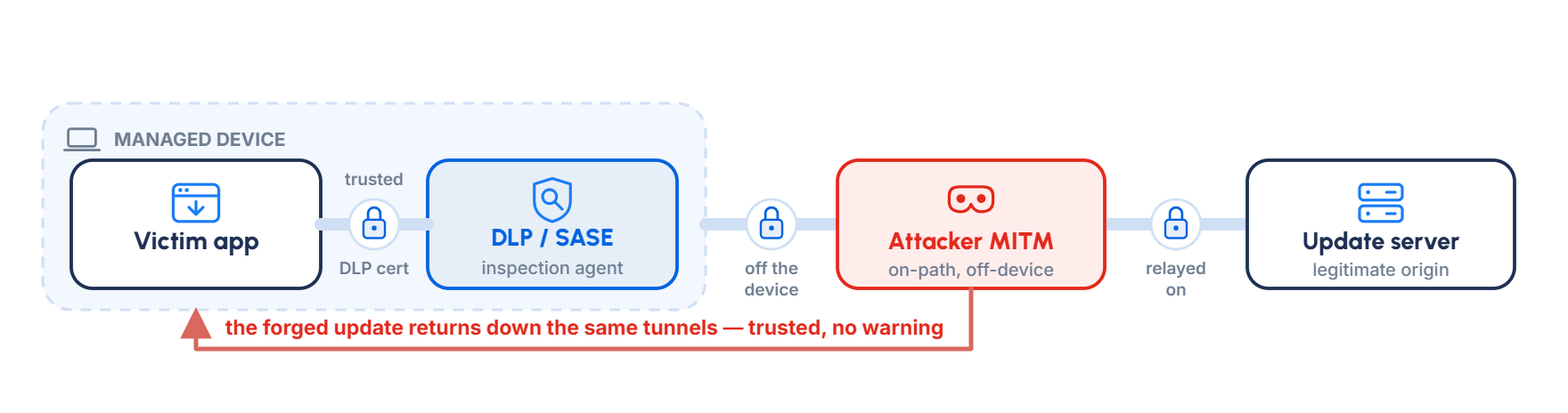
To ensure data protection, DLP solutions have to inspect HTTPS traffic by intercepting it themselves and establishing the TLS tunnel with their own certificate, which is added to the computer’s trust store during the installation process.
If an attacker can gain access to the DLP’s admin panel, they can force inspection of the update domain, causing the MITM to serve the DLP’s certificate and bypassing the trust requirement.
Alternatively, if the organization has already configured full inspection of all traffic, the attacker might not even need to do anything to achieve this.
Active Directory Certificate Services
Active Directory Certificate Services (AD CS) is a Windows Server role that enables organizations to manage public key infrastructure (PKI) and issue digital certificates. These certificates can be used for server and user identity verification and for digital signing across the environment, whether for code and executables or network traffic.
To generate certificates, network administrators create certificate templates, which users and servers then use to request certificates for themselves. Because these templates are configured by hand, misconfigurations are common. Those misconfigurations have been researched heavily, since they can be abused to achieve elevation of privilege in a Windows Active Directory environment. Most notable are the ESC techniques documented by SpecterOps.
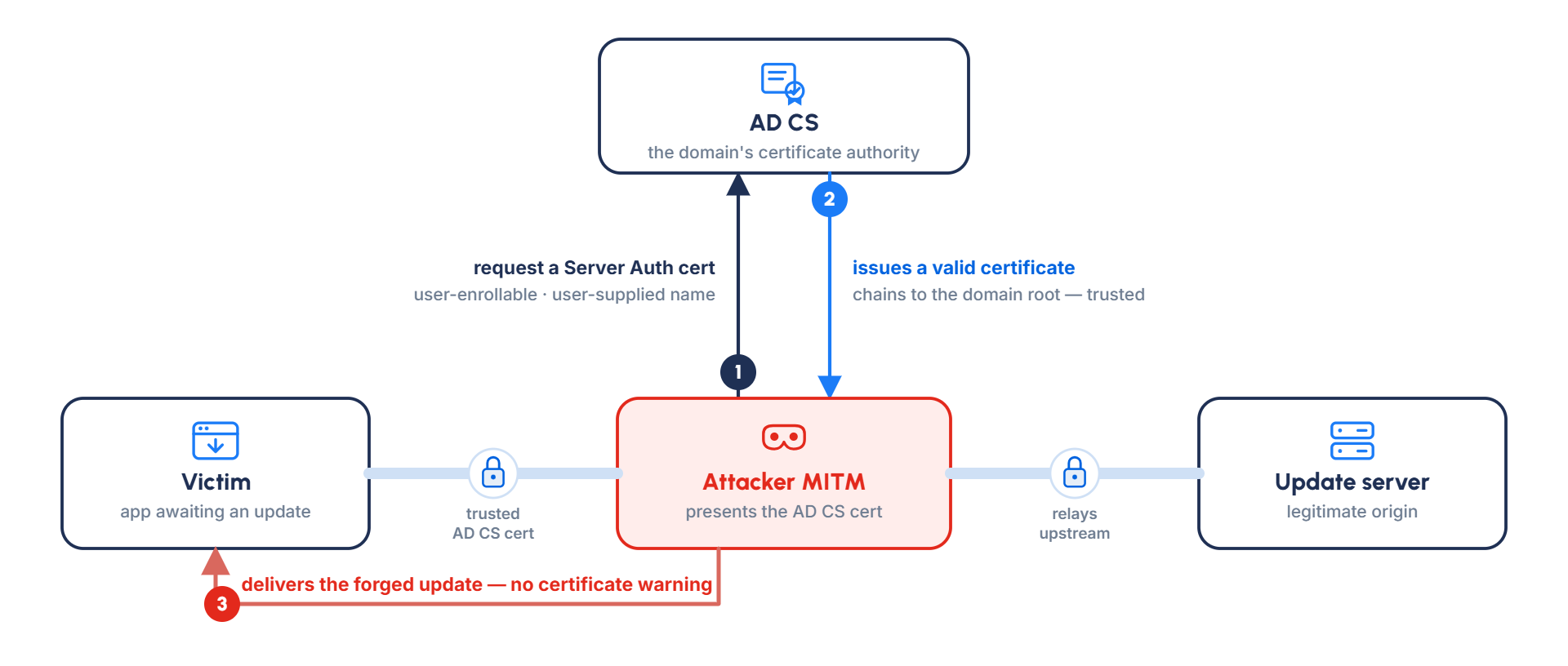
Of course, we aren’t trying to take over the entire Active Directory domain, just to impersonate one specific address used for updates. For that, all we need is a certificate template for Server Authentication that is both user-enrollable and accepts a user-supplied subject name. This is leagues below the misconfiguration required for a successful ESC attack, so it will also fly under the radar of any AD CS configuration scanner, like Certipy.
So the attack flow is very similar to the general attack flow, with an added first step of obtaining a server certificate from AD CS.
Conclusions
Most AI coding tools still treat their update channel as an afterthought. Once you can terminate TLS, which becomes possible in enterprise networks via SASE, DLP or a usable AD CS template, the rest of the attack is just swapping one binary for another. Cursor, Antigravity, VSCode, Claude Desktop and Claude Code all fall to this.
This moves AI tooling security out of the realm of AI security and into enterprise security. Now, the risk with AI coding assistants isn’t just indirect prompt injections or rogue tool use; it’s actually lateral movement and remote code execution.
Vendors already know how to fix this: ship signed binaries and actually check the signature before running them. Judging by our disclosures, they don’t seem to intend to, so the responsibility falls on the network security teams instead.
Disclosure Timeline
June 14, 2026 - Cursor disclosure
June 16, 2026 - Cursor closed as out of scope
June 16, 2026 - MSRC disclosure
June 18, 2026 - Anthropic disclosure
June 18, 2026 - Anthropic closed as informative
June 26, 2026 - MSRC closed as informative

